Saturday, July 16, 2016
Sunday, June 26, 2016
Add custom CSS to your blogger blog
Once you start writing stuff regularly on your blog you will soon start to need custom stuff - like adding custom styles to the blog. This is how you do it on blogger.
1. Select the blog to update and in the Options Menu click Options
2. Click on the Customize button next
3. Next Select Advanced and Add Css as shown below
Add your CSS there and refer it in the HTML of your blog.
1. Select the blog to update and in the Options Menu click Options
2. Click on the Customize button next
3. Next Select Advanced and Add Css as shown below
Add your CSS there and refer it in the HTML of your blog.
Monday, June 20, 2016
Azure Command line tools - uploading blob to storage account
Most of your "cloud" workflows would require automating some operations that are part of your cloud service. I recently had to upload a blob to blob storage as part of a batch file. How to do that ? azure cli comes to the rescue.
Install Azure CLI as mentioned here : https://azure.microsoft.com/en-in/documentation/articles/storage-azure-cli/
That makes available the 'azure' command on your command line.
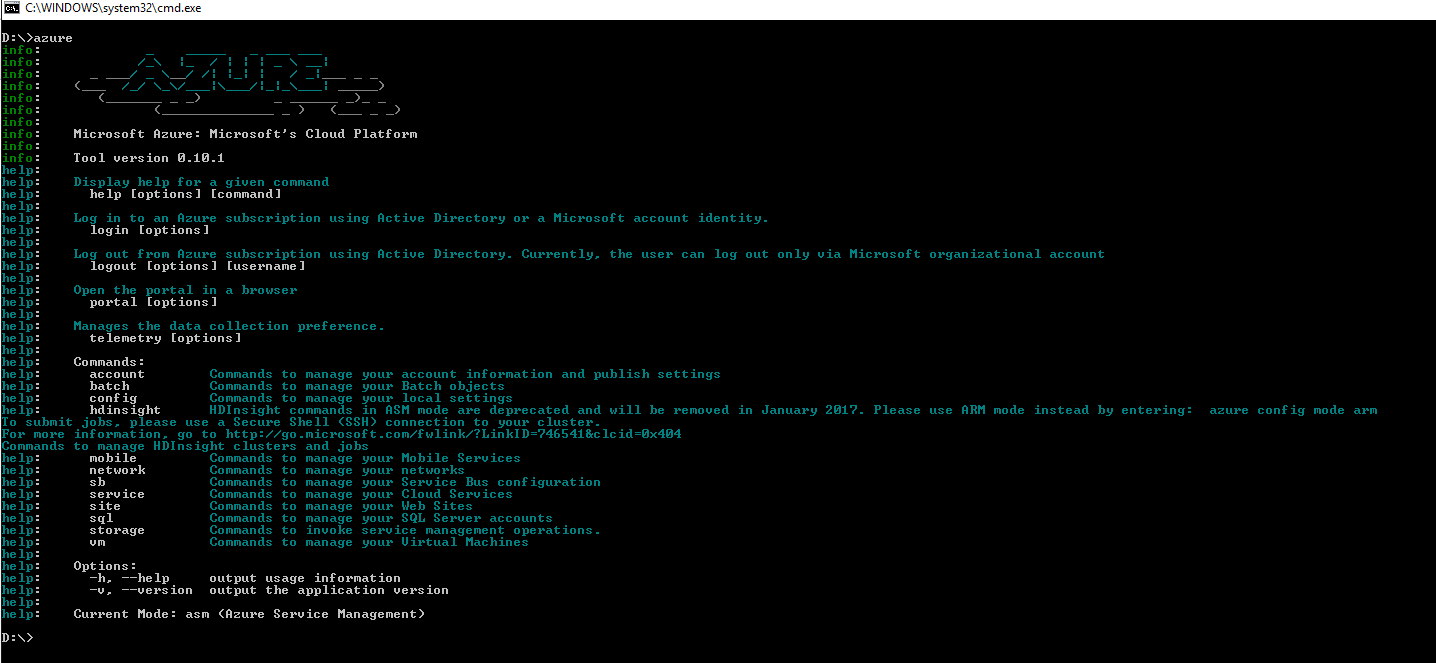
The help is quite exhaustive.
To upload a blob I used the following :
Install Azure CLI as mentioned here : https://azure.microsoft.com/en-in/documentation/articles/storage-azure-cli/
That makes available the 'azure' command on your command line.
The help is quite exhaustive.
To upload a blob I used the following :
azure storage blob upload -f FILE_ON_DISK --container YOUR_CONTAINER_NAME --connection-string STORAGE_BLOB_CONNECTION_STRING
Use the
--quiet option if you want to overwrite an existing blob on the cloud.
Labels:
azure,
azure-cli,
azure-storage,
blob,
blob-upload
Sunday, June 5, 2016
Loading Excel (.xlsx) files in C#
So I needed to write an app (console) that would read and process an excel file. A quick search would lead me to this stackoverflow post which suggests using the Linq-To-Excel package.
Linq-To-Excel has a Nuget package and is easily installed. This nice little snippet in that post is self explanatory:
var data= new LinqToExcel.ExcelQueryFactory(@"MyFile.xlsx");
var query =
from row in data.Worksheet("MySheet")
let item = new
{
Id = row["Id"].Cast<string>(),
Name= row["Name"].Cast<string>(),
Age= row["Age"].Cast<int>(),
}
select item;
foreach ( var item in query) {
Console.Writeline(item.Id "\t" item.Name);
}
Except that the following run time exception will be thrown when you start iterating through the results (the microsoft.ace.oledb.12.0 provider is not registered)
This is easily resolved by installed the Microsoft Access Database engine from this page : - and there you go - load up any excel file just like any simple TSV!
Tuesday, May 24, 2016
Javascript being cached during development time by Visual Studio and Internet Explorer
So I am working on this website and need to make some changes to a javascript file in the site. The changes I made was to disable elements of div containers having a particular tag. I make the change and hit F5.
The divs are not disabled. I add a break point to the JavaScript file in Visual Studio and see that the break point is not enabled indicating that something is amiss. The changed JavaScript was not loaded at all.
Searching this led me to the following post on StackOverflow.
The answer essentially is to do a CTRL+F5 or try to open the link in a different browser.
The divs are not disabled. I add a break point to the JavaScript file in Visual Studio and see that the break point is not enabled indicating that something is amiss. The changed JavaScript was not loaded at all.
Searching this led me to the following post on StackOverflow.
The answer essentially is to do a CTRL+F5 or try to open the link in a different browser.
How To - Develop a Simple Outlook 2013 Add-in in C#
This post explains creating a simple outlook add-in using Visual Studio 2013 and some details on accessing various mail properties in the add-in.
Required Tools
- Visual Studio 2013 ( you could also work with Visual Studio 2012)
- VS tools for Office - Download and install from here : http://blogs.msdn.com/b/lightswitch/archive/2014/03/03/office-developer-tools-for-visual-studio-2013-march-2014-update.aspx
Creating a Project
Create a new Outlook 2013 Add-in by selecting New Project -> Office / Sharepoint -> Outlook 2013 Add-in as shown below:
This will create a partial class called ThisAddIn.cs with two methods
- ThisAddIn_StartUp
- ThisAddIn_Shutdown
As is obvious - any initialization operations can be done in the StartUp function and any cleanup in the Shutdown function.
References
- Ribbon Designer - http://msdn.microsoft.com/en-us/library/bb386089.aspx
Saturday, December 20, 2014
How To - Roslyn (Microsoft.CodeAnalysis) Console project from scratch on Visual Studio 2013
So I had a requirement where I needed to extract method call information from C# files. Microsoft's Compiler Platform Roslyn was the way to go. The following software will need to be installed on your machine.
Installing required tools
- Visual Studio 2013 ( the official page mentions that you require Visual Studio 2015 Preview - but one can work with 2013)
- To use MSBuildWorkspace class to load up solutions you need the MSBuild tools 2014 version - which can currently only be obtained through the Visual Studio 2014 CTP iso, As mentioned here you will need to install the 2014 MSBuild from the Visual Studio "2014 CTP" iso from here.
Creating the project
- Create a new Console Application Project
- Install the required Nuget packages
- Microsoft.CodeAnalysis -Pre
- This can either be done using the Nuget Package Manager Console with the following command
The -Pre indicates that it is a PreRelease package
- You can use the Nuget Package Manager UI. Set the 'Include PreRelease' option to enable finding the Microsoft.CodeAnalysis pre-release package as below.
- Microsoft.Composition package
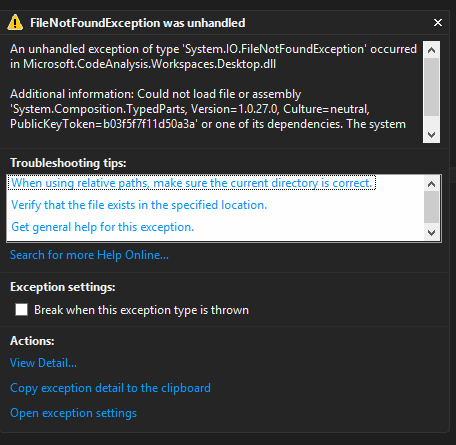
- Without this package you end up getting the exception shown below about unable to load the assembly System.Composition.TypedParts. I wonder if MS should make this a dependent package for the CodeAnalysis package ...
Some Code
I use the following code to load a solution
var ws = MSBuildWorkspace.Create();
ws.OpenSolutionAsync(solutionName).Wait();
That's pretty much it.
Roslyn allows you to compile projects, resolves project dependencies so that projects within a solution can be compiled in correct order, get detailed error information and more.
I also use the Nuget.Core package to download and install all packages required for each project. Note also that Roslyn only supports C# and VB currently.
Subscribe to:
Posts (Atom)