Showing posts with label visual studio 2013. Show all posts

Sunday, June 5, 2016

Loading Excel (.xlsx) files in C#

So I needed to write an app (console) that would read and process an excel file. A quick search would lead me to this stackoverflow post which suggests using the Linq-To-Excel package.

Linq-To-Excel has a Nuget package and is easily installed. This nice little snippet in that post is self explanatory:

var data= new LinqToExcel.ExcelQueryFactory(@"MyFile.xlsx");

var query =
    from row in data.Worksheet("MySheet")
    let item = new
    {
        Id = row["Id"].Cast<string>(),
        Name= row["Name"].Cast<string>(),
        Age= row["Age"].Cast<int>(),
    }
    select item;

    foreach ( var item in query) {
        Console.Writeline(item.Id "\t" item.Name);
    }

Except that the following run time exception will be thrown when you start iterating through the results (the microsoft.ace.oledb.12.0 provider is not registered)


This is easily resolved by installed the Microsoft Access Database engine from this page : - and there you go - load up any excel file just like any simple TSV!

Tuesday, May 24, 2016

Javascript being cached during development time by Visual Studio and Internet Explorer

So I am working on this website and need to make some changes to a javascript file in the site. The changes I made was to disable elements of div containers having a particular tag. I make the change and hit F5.

The divs are not disabled. I add a break point to the JavaScript file in Visual Studio and see that the break point is not enabled indicating that something is amiss. The changed JavaScript was not loaded at all.

Searching this led me to the following post on StackOverflow.

The answer essentially is to do a CTRL+F5 or try to open the link in a different browser.

How To - Develop a Simple Outlook 2013 Add-in in C#

This post explains creating a simple outlook add-in using Visual Studio 2013 and some details on accessing various mail properties in the add-in.

Required Tools

  • Visual Studio 2013 ( you could also work with Visual Studio 2012)
  • VS tools for Office - Download and install from here : http://blogs.msdn.com/b/lightswitch/archive/2014/03/03/office-developer-tools-for-visual-studio-2013-march-2014-update.aspx
    • The executable starts the Web Installer which looks like the following:

Creating a Project

Create a new Outlook 2013 Add-in by selecting New Project -> Office / Sharepoint -> Outlook 2013 Add-in as shown below:


This will create a partial class called ThisAddIn.cs with two methods
  • ThisAddIn_StartUp
  • ThisAddIn_Shutdown
As is obvious - any initialization operations can be done in the StartUp function and any cleanup in the Shutdown function.


References

  1. Ribbon Designer - http://msdn.microsoft.com/en-us/library/bb386089.aspx


Saturday, December 20, 2014

How To - Roslyn (Microsoft.CodeAnalysis) Console project from scratch on Visual Studio 2013

So I had a requirement where I needed to extract method call information from C# files. Microsoft's Compiler Platform Roslyn was the way to go. The following software will need to be installed on your machine.

Installing required tools

  • Visual Studio 2013 ( the official page mentions that you require Visual Studio 2015 Preview - but one can work with 2013)
  • To use MSBuildWorkspace class to load up solutions you need the MSBuild tools 2014 version - which can currently only be obtained through the Visual Studio 2014 CTP iso, As mentioned here you will need to install the 2014 MSBuild  from the Visual Studio "2014 CTP" iso from here.

Creating the project

  1. Create a new Console Application Project
  2. Install the required Nuget packages
    • Microsoft.CodeAnalysis -Pre
      • This can either be done using the Nuget Package Manager Console with the following command
                              Install-Package Microsoft.CodeAnalysis -Pre

                              The -Pre indicates that it is a PreRelease package
      • You can use the Nuget Package Manager UI. Set the 'Include PreRelease' option to enable finding the Microsoft.CodeAnalysis pre-release package as below.
    • Microsoft.Composition package
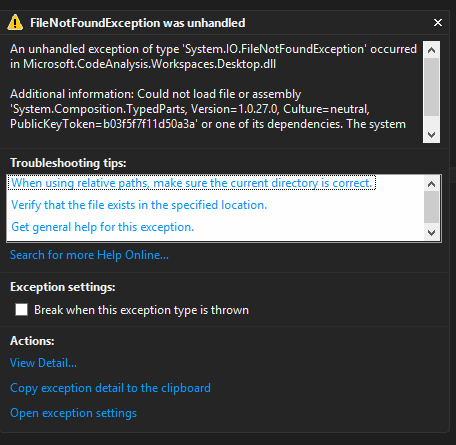
      • Without this package you end up getting the exception shown below about unable to load the assembly System.Composition.TypedParts. I wonder if MS should make this a dependent package for the CodeAnalysis package ...

Some Code

I use the following code to load a solution

var ws = MSBuildWorkspace.Create();
ws.OpenSolutionAsync(solutionName).Wait();

That's pretty much it.

Roslyn allows you to compile projects, resolves project dependencies so that projects within a solution can be compiled in correct order, get detailed error information and more.

I also use the Nuget.Core package to download and install all packages required for each project. Note also that Roslyn only supports C# and VB currently.